
Marking criteria locked
These marking criteria are read-only because student feedback wording has already been prepared for this assessment. Use Edit Student Feedback in the Marking Criteria Library if that wording needs to be updated.
Assessment Details
These details stay visible while you work.
Criteria & Feedback
Paste spreadsheet data, load existing Gradeybird criteria, or start from a template
Copy cells directly from Excel or Google Sheets and paste below:
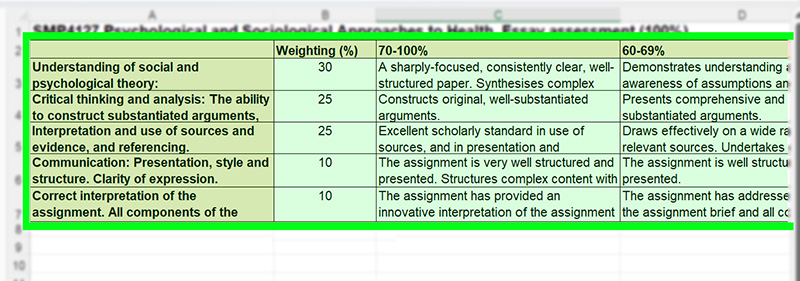
[Col 1: Criterion] | [Col 2: Marks] | [Col 3+: Grade Band Feedback]
Paste an existing Gradeybird JS configuration to parse and edit:
Start from a template to pre-populate the criteria, grade bands and suggested feedback. Everything can be edited after the template is loaded.
Postgraduate templates
Undergraduate templates
Spreadsheet data updates the preview automatically. Templates load through Existing JS Code Ingest and render using the same parser.
Preview & Export
Check the generated marking criteria, save it to Gradeybird, then copy the Blackboard table.
Waiting for marking criteria
Add or load marking criteria to check whether it is ready to save.
Marking Criteria Preview
Check the table below before saving it to Gradeybird.
No marking criteria data loaded yet.
Save & Export
Not signed in? You can still create marking criteria.
When you are finished, download both files below and email them to l.miller@sheffield.ac.uk so they can be checked and added to Gradeybird.
Authorised Gradeybird editors can sign in and save directly to the server instead.
Save the latest version to Gradeybird before copying the Blackboard table.
Download both files, then attach them to an email for the Gradeybird editor.
Email files to LukeAdvanced / Technical details Gradeybird configuration and generated JS
Gradeybird Module Configuration
Technical configuration line for the allModules array.
// Generated JavaScript code will appear here...