Step 1: Module & Assessment Details
Enter the basic identification metadata for this marking criteria grid
Unique module identifier code.
Name of the assessment task.
Full descriptive title of the module.
Step 2: Input Marking Criteria Data
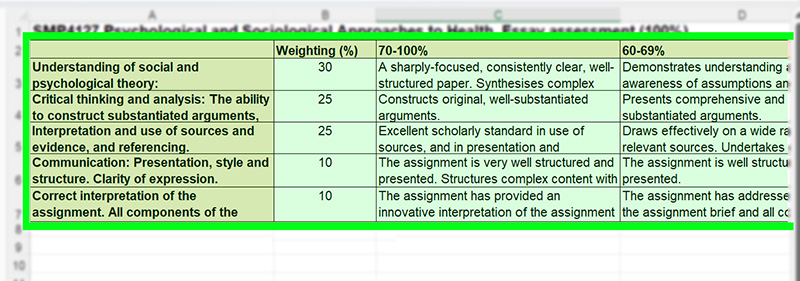
Copy & paste directly from Excel or Google Sheets
Copy cells directly from Excel or Google Sheets and paste below:
[Col 1: Criterion] | [Col 2: Marks] | [Col 3+: Grade Band Feedback]
Paste an existing Gradeybird JS configuration to parse and edit:
Download & Finalize Setup
Download the generated files below and submit them as email attachments to Luke Miller. The .txt file is for the Gradeybird server, and the .html file is for Blackboard.
// Generated JavaScript code will appear here...No marking criteria data loaded yet.